


Gravity Forms GetResponse AddOn
The Gravity Forms GetResponse Add-On allows you to quickly integrate all of your online forms with the GetResponse email marketing service. Collect and add subscribers to your GetResponse marketing list when a form is submitted
-
Seamless Integration
- Automatically add subscribers to your email lists when a form is submitted.
-
Custom Fields
- Populate and create GetResponse custom fields from form field data.
-
Opt-In
- Control opt-in and only add subscribers when a certain condition is met.
GRAVITY FORMS GETRESPONSE ADDON
Setting Up the GetResponse Add-On
Pre-Requisites
- Download and install the add-on
- A GetResponse account
GRAVITY FORMS GETRESPONSE ADDON
Getting to your Settings Page
To access the add-on setting page you will need to be logged into your WordPress admin dashboard. On the left-side navigation menu, hover over Forms and click on Settings. From there, click the GetResponse tab.
Settings
Refer to screenshot at bottom.
API Key
Enter your GetResponse API Key. Your GetResponse API account information can be found by logging into your GetResponse account, going to the Integrations & API page, clicking on the API link from the left side menu, and accessing your API key information.
We support the newer v3 of the GetResponse API from add-on version 1.2.1. Earlier versions of the API are no longer supported.
Account Type (version 1.2.1+)
The GetResponse API v3 uses different endpoints for their MAX (360/Enterprise) plan. As such, you must specify the GetResponse plan you are using in order for us to direct API calls to the proper place. Choose MAX if you are on that plan, or Standard for all other plans.GRAVITY FORMS GETRESPONSE ADDON
When the MAX account type is selected additional settings will be displayed for the Domain (v1.2.1+) and Endpoint (v1.4.2+).
When you click Update Settings, you will be notified by a green check mark beside the API key box if all seems good. If you do not see a green check mark, double check your information and try again.GRAVITY FORMS GETRESPONSE ADDON
Next Steps
You will want to create a feed in order to begin sending information to your GetResponse account. Refer to this document for instructions.
Add-on Framework Hooks
Because the GetResponse Add-On is built using the Add-On Framework it also inherits any hooks available in the framework methods it uses such as:
- gform_{$SHORT_SLUG}_field_value for changing a field value before it is passed to GetResponse.
Screenshot
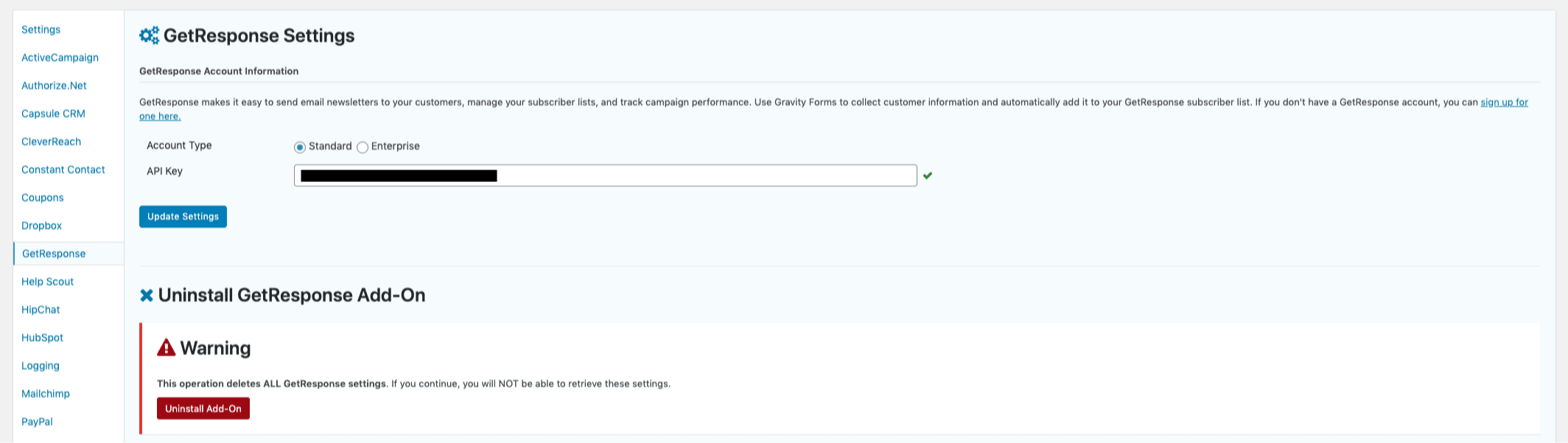
Caption: GetResponse Add-On Settings as of version 1.2.1 and higher.
